
CASE STUDY — 2024
Testing cut my original 5×5 grid down to a familiar 3×3, with a passcode fallback so no one gets locked out of their own alarm. A concept that addresses passive snoozing through active pattern matching.
Role
Product designer (solo)
Timeline
Platform
iOS
Scope
Self-initiated concept
TLDR;
Overview
I designed Cognitive Alarm, an app that replaces the snooze button with a short pattern-matching task to help people stop oversleeping. I worked on it alone, grounding the concept in existing sleep and behavioral research, testing early wireframes, and designing through to final high-fidelity screens.
THE PROBLEM
Hitting snooze has become easier than getting up
I’ve seen how common it is for people to struggle waking up. Friends often set upwards of ten alarms just to get out of bed.
To see if this was a wider pattern, I looked into snoozing habits more broadly, and the numbers back it up:
57%
Of adults regularly hit snooze or delay getting up.
UNIVERSITY OF NOTRE DAME, PUBLISHED IN THE JOURNAL SLEEP.
1 in 3
People set more than one alarm to make sure they wake up.
SLEEP JUNKIE SURVEY, 1,000+ US ADULTS.
RESEARCH
Grounding the solution in real behavioral science
Snoozing is easy because it takes almost no effort. I wanted to understand what would actually interrupt that habit, so I looked into sleep and behavioral research to find out. What I found was that enough mental effort in the moment can break the habit, enough that once the alarm stops, the person is awake and ready to start their day.
Two ideas stood out, and together they shaped how I approached the design:
CONCEPT 01 / SLEEP INERTIA
Sleep inertia
The grogginess right after waking that affects focus and coordination. Any solution had to work within that reduced capacity.
CONCEPT 02 / BEHAVIORAL ACTIVATION
Behavioral activation
The idea that a small, active task can interrupt a passive habit. This is why replacing the snooze button with any task at all made sense.
THE SOLUTION
Replacing the snooze button with a short task
Users complete a short pattern on a grid to stop the alarm. The task takes just enough mental effort to interrupt the habit of snoozing, grounded in sleep inertia and behavioral activation.
People are groggy and less coordinated right after waking
The task has to be simple enough to complete in that state
A single tap or swipe doesn’t require enough effort to break a habit
A short task requires enough active effort to interrupt it
I designed the task to be something a groggy, half-awake person could still get right, while still requiring enough attention to keep them from drifting off again.
WIREFRAMES
Exploring the core mechanic
Early sketches focused on the 5×5 grid and how a user would interact with the pattern to stop the alarm.

HOME SCREEN
The pattern to stop the alarm
A 5×5 grid with shapes like a star, requiring the full pattern to be drawn before the alarm stops.

RETRY SCREEN
A way to try again
If the pattern wasn’t right, the screen prompted another attempt.
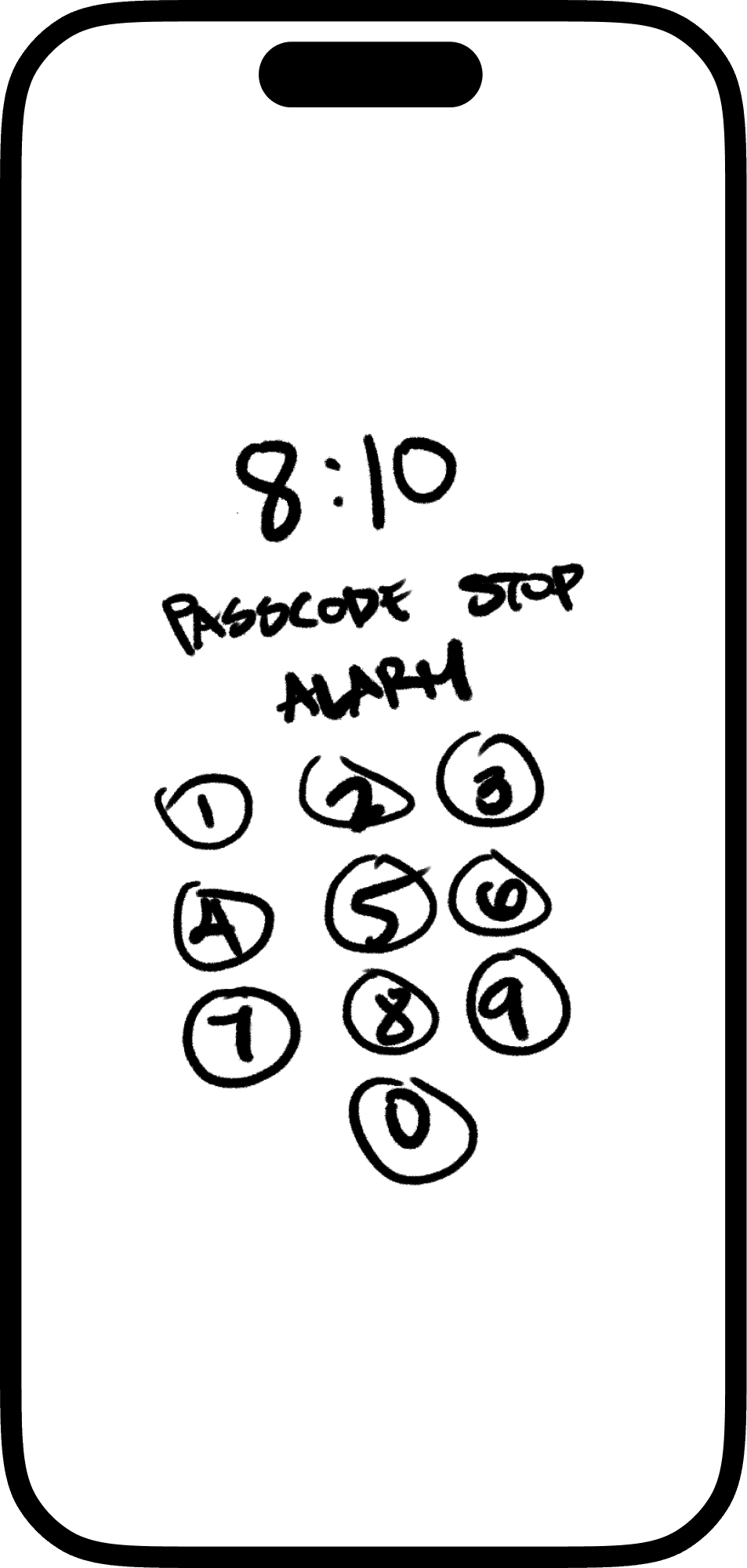
PASSCODE SCREEN
A fallback that still works
If the pattern kept failing, users could fall back to their phone’s passcode to stop the alarm.
DESIGN PROCESS
Testing revealed my original grid idea was too complex
I started with a 5×5 grid using shapes like a star, octagon, and trapezoid, assuming more pattern options meant better engagement.
I tested it two ways. First on myself, then with a small recruited group.
PARTICIPANT SAMPLE
RECRUITING
8 participants, recruited through Lyssna
AGE
19 to 58
GENDER
Four women, three men, one non-binary
VARIATION
Device platform, technical proficiency, and prior experience with pattern-based interactions
01
Self-testing
I tried drawing the patterns myself. With dots, sliding accurately from one correct dot to the next was harder than expected.
02
User testing
Participants were confused by the number of dots, since 3×3 is the standard most people expect, and struggled to figure out how to approach the pattern.
03
The fix
Both tests pointed to the same change: a 3×3 grid, familiar and easier to complete accurately.
KEY SCREENS
What the interactions look like in high fidelity
Four screens show the core interaction: completing the pattern, seeing it fail, falling back to a passcode, and turning the feature on or off.

CORRECT PATTERN MATCH
What a match looks like
When the user completes the pattern correctly, the circles turn green to confirm the match.

INCORRECT PATTERN MATCH
When there’s no match
The circles turn red so the user knows to try again.

PASSCODE SCREEN
Fallback mechanism
After three failed attempts, the screen switches to your standard 6-digit passcode.

ALARM SETTINGS
An optional feature
Cognitive Mode can be toggled in alarm settings, so you only use it if you want it.
OUTCOMES
What I would watch to know if this works
This is a concept, so there are no results yet. These are the measures I would track in a build, and what each one would tell me.
A simple pattern design
Time from alarm to pattern completion. Under about ten seconds would mean the task is doable while groggy. Much longer, and the friction is too high for a morning.
Three attempts with a passcode fallback
How often people reach the passcode. Frequent use would mean the pattern is too hard, or that people are using it as a snooze.
Optional availability
How many people keep the feature on after a week. Early turn-off would tell me the friction is not worth the benefit to them.
REFLECTION
Looking back and moving forward
This concept has not been tested in the moment it was designed for. These are the assumptions I made, and what I would do to check each one.
My first instinct was that more options would make the task more engaging. Testing showed the opposite. People were confused by the extra dots and unsure how to approach the pattern, and the familiar 3×3 was easier to complete. I now start from what people already know how to do.
DESIGN CONSIDERATIONS
The grid size is still unproven
The 3×3 grid is a starting point based on common patterns, but further testing is needed to confirm it provides the ideal amount of engagement.
The fallback could become the new snooze
A user could fail the pattern on purpose to reach the passcode. I assumed that path still takes more effort than a snooze, but I have not measured it.
A limit of my testing
I tested the pattern with participants who were awake and alert. The design is for someone who has just woken up, so I have not yet tested it in the state it was built for.
WHAT’S NEXT
Build a working prototype
A functional prototype is enough to test whether the 3×3 pattern can be completed accurately. I can build that myself, and it would confirm the mechanic before anything gets engineered.
Time both paths
Measure how long the pattern takes against the passcode path. If the fallback is faster, the friction is in the wrong place.
Partner with an engineer
Testing real wake-up behavior needs an alarm that runs on a participant’s own phone, which is past what I can prototype alone. With an engineer and a small beta build, a week-long diary study would show how the pattern holds up in a dark room, in bed, by someone who has just woken up.
