
CASE STUDY — 2024
Addressing the barriers of time and anxiety in remote healthcare. Two rounds of usability testing turned a doctor list nobody could navigate into a search-first home screen, a symptom-based search, and a verification step that lets people catch their own mistakes.
Role
Product designer (solo)
Timeline
Jun – Aug 2024
Platform
iOS
Scope
Self-initiated concept
TLDR;
Overview
I designed MedConnect, an app that helps people book and manage healthcare appointments without long wait times. I worked on it alone, handling user interviews, competitive analysis, two rounds of usability testing, and design from wireframes through final high-fidelity screens.
THE PROBLEM
A routine refill shouldn’t take a month to book
I needed some important prescriptions refilled. The next available appointment with my doctor was about a month out, and it wasn’t a one-time event. It happened every time I needed to see the doctor.
To understand if this was a common issue, I looked into broader healthcare trends in the United States. It turns out, this is what most people deal with when trying to book care, and the statistics back it up:
1 month
Typical wait time for a new appointment in the US is reported at two weeks to a month.
AMN HEALTHCARE, 2025 SURVEY OF PHYSICIAN APPOINTMENT WAIT TIMES. SURVEY OF PHYSICIAN OFFICES IN 15 MAJOR US METRO AREAS.
45%
cite access to technology, including broadband and computers, as a barrier to using telehealth.
BIPARTISAN POLICY CENTER, 2021. SURVEY OF 1,766 ADULTS.
RESEARCH
Busy schedules and anxiety were the two biggest barriers
To get a deeper understanding of the problem, I conducted exploratory interviews with 12 people about how they currently handle their healthcare. Ten described the same barriers. Two had neutral or good experiences getting medical help, which told me the problem is common but not universal. Mapping the answers helped me spot clear, recurring patterns:
Participants ranged from early 20s to late 30s, and had all either used telehealth services or needed to book an appointment with a healthcare provider.
WHAT I ASKED
01
Do you regularly stay on top of your health and get regular checkups from a doctor?
02
How are you currently getting medical care?
03
What challenges (if any) are currently preventing you from getting the medical attention you need?
04
What features or tools would make it easier for you to manage your healthcare needs through an app?
05
In an ideal app, how would you prefer to receive medical care or schedule appointments?
I grouped the answers by theme to see which barriers repeated across the 12 interviews.
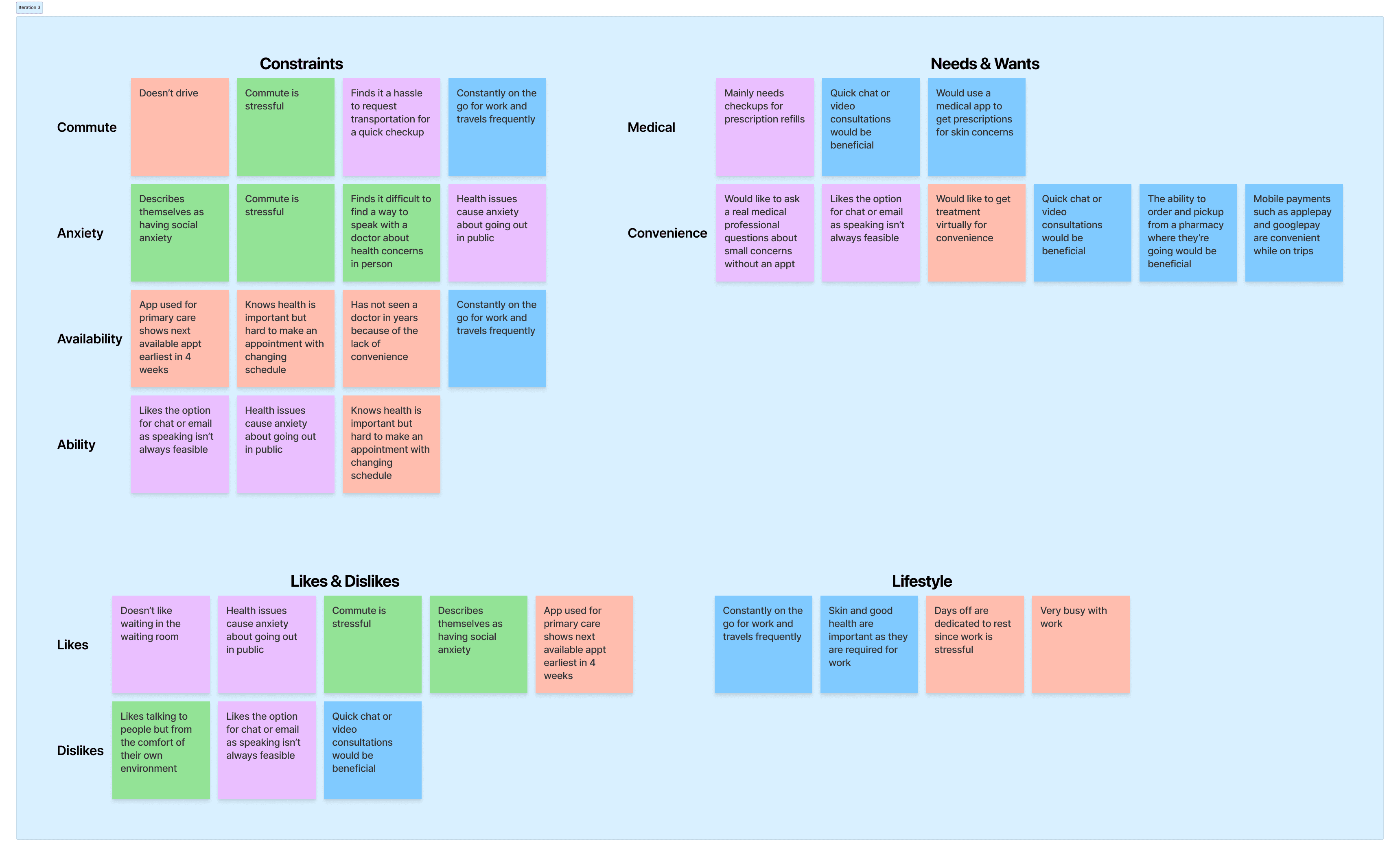
FIG 01 — AFFINITY MAP. RESPONSES GROUPED BY THEME: CONSTRAINTS, MEDICAL NEEDS, CONVENIENCE, AND LIFESTYLE.
01
The app used for primary care shows the next available appointment four weeks out.
02
Work schedules leave almost no room to book, let alone attend.
03
Existing anxiety creates a barrier to scheduling care at all.
Published US research backed up what I was hearing in these sessions. Here’s what it showed:
61%
of US patients skipped a doctor visit in the past year because scheduling was too much of a hassle.
NOTABLE, 2022. SURVEY OF 1,005 US PATIENTS.
40%
of Americans put off seeing their provider because of anxiety about what awaits them at the visit.
PATIENTPOINT, 2023 PATIENT CONFIDENCE INDEX. SURVEY OF 2,000 AMERICANS BY ONEPOLL.
Together these patterns pointed at who MedConnect is for: busy individuals, parents, and people with social anxiety.
COMPETITIVE ANALYSIS
What three telehealth apps already do well
I used the three apps people already book remote care through. Each one covered part of the problem and left something missing that I could design for.

Doctor on Demand
Video visits with doctors and mental health providers, for urgent and routine care.
STRENGTHS
24/7 availability
Basic, uncluttered UI
GAP
No communication between sessions

Zocdoc
Patients find doctors, read reviews, and book in-person or virtual appointments.
STRENGTHS
Real-time appointment availability
Wide range of filters
GAP
Users billed out-of-network despite in-network listings

K Health
24/7 telehealth with symptom checking and a subscription price.
STRENGTHS
Unlimited visits via subscription
24/7 availability
GAP
No in-person appointment option
WHAT I TOOK INTO THE DESIGN
Zocdoc
Real-time availability and filters led me to open the home screen with a list of available doctors, and to build search around visit type, insurance, and location.
Doctor on Demand + K Health
Both offer care at any hour of the day, so I treated 24/7 availability as a baseline requirement for MedConnect.
THE SOLUTION
Time and comfort were what I kept in mind while designing
Two things stood out in my research and they helped me decide what to build.
Anxiety made some ways of connecting harder than others, so I added chat, email, video, and in-person options so people could pick what felt manageable.
FEASIBILITY
What I’d need to settle with engineering before this ships
I designed MedConnect alone. None of it was checked for cost or compliance. Four questions would need to be settled with an engineering partner before this ships.
01
24/7 doctor availability
Availability at any hour is a staffing question before it is a product question. If overnight coverage is thin, the screens need to show a wait estimate and another way to get care. An availability badge alone overpromises when coverage does not back it up.
02
HIPAA and telehealth licensing
HIPAA governs what a chat thread can store and what a notification can say. Telehealth licensing works state by state. Search needs to filter doctors by patient location, not just specialty.
03
Scheduling and backend capacity
Live availability means writing to provider calendars and handling double bookings and cancellations. Search cannot show a specific time slot until the freshness of that scheduling data is known.
04
Access for low-bandwidth users
Published research says 45% of patients name technology access as a barrier to telehealth. A video-first app cannot reach them. I would want to know whether chat and phone can work on a slow connection, and what the app does when video fails.
DESIGN RATIONALE
Testing the wireframes revealed three problems
I started with three screens, each built around a specific assumption.
Home screen: A list of available doctors
I assumed showing available doctors right away would get people into a conversation faster.
Search: Visit type, insurance, location
I built search as a series of steps and pages, narrowing down one filter at a time.
Order confirmation: After the prescription was issued
Automatically processes the order as soon as the prescription was issued.

FIG 01 — WIREFRAME FLOW, ROUND ONE
I tested these wireframes with 4 people. Three problems came up consistently:
The doctor list was confusing
Most people had a specific need, but the home screen showed a list professionals online, with no way to narrow it down.
Searching by visit type didn’t make sense
People wanted to search by symptom, doctor type, or location instead.
Orders had no way to check for mistakes
Orders went straight through, so people questioned whether all the correct details were captured.
ITERATION 1
Fixing the core flows
I updated the designs to address the three main issues from testing: simplifying the home screen, streamlining the search, and adding a final review step before checkout

Focused the starting point
A single, clear call-to-action (CTA) replaces the overwhelming list of doctors.
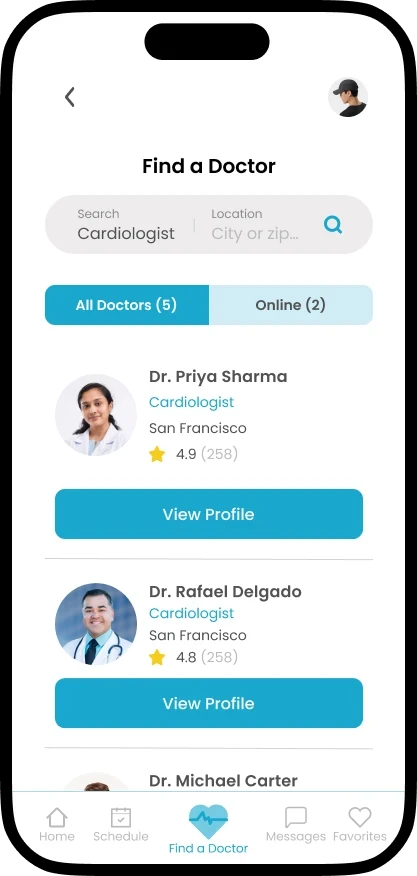
Rebuilt how search works
Search by symptom, doctor type, or location
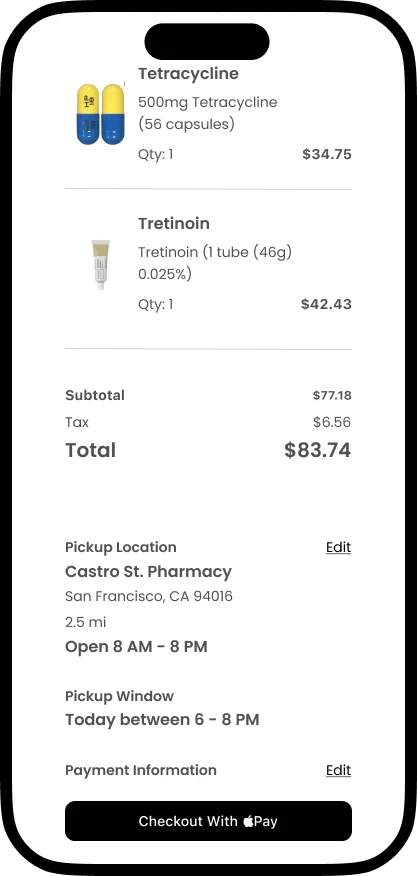
Added a check before checkout
A verification screen now sits before anything gets sent
ITERATION 2
Testing the first full design found more to fix
I tested the high-fidelity designs with the same 4 people. Their feedback shaped these final changes.
HOME SCREEN

BEFORE
AFTER
01
No hero section
Search is the first thing on the screen.
02
Search asks for condition, location, and insurance
Enough to find the right doctor without extra screens.
03
Upcoming appointments listed below search
Easy to see what’s coming up without leaving the home screen.
DOCTOR PROFILE

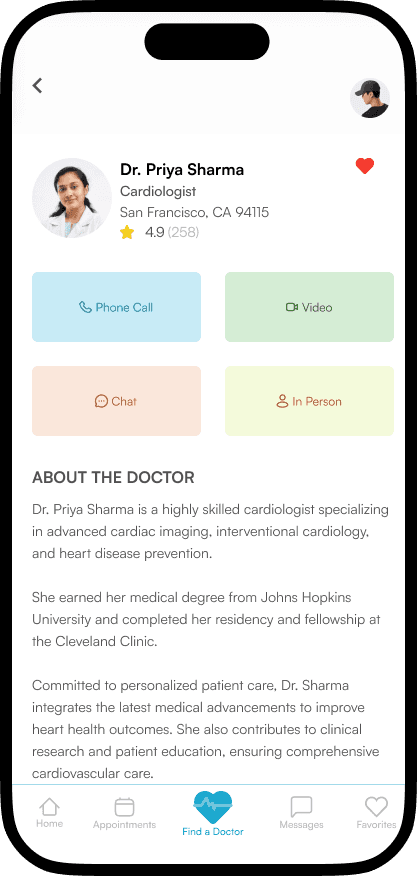
BEFORE
AFTER
01
Visit types moved to the top
Right under the doctor’s info, before anything else.
02
Each type of visit is color-coded
Clear at a glance which ways to connect work for that doctor.
03
Doctor bio moved further down
Visit options come first, background comes after.
SEARCH SCREEN


BEFORE
AFTER
01
Search works by specialty and location
The dedicated search screen now matches what people actually wanted.
02
Search bar stays at the bottom
Always available — no scrolling back up to adjust it.
ORDER VERIFICATION


BEFORE
AFTER
01
A full review screen before checkout
Order summary, pickup details, and payment, all visible before confirming.
02
Patient name and prescription ID shown clearly
A way to catch a mistake before the order goes out.
03
Pickup location and ready time included
No confusion about where or when to pick it up.
PHARMACY PICKUP


BEFORE
AFTER
01
The map sits in a smaller rectangle
02
Search moved below the map, with a label
A zip code or city field sits under its own heading instead of floating over the map, so it reads as a step rather than an overlay.
03
Nearby pharmacies listed under the search
Each pharmacy shows its address, distance, phone number, and open or closed status, with a count of how many are nearby.
HOW THESE SCREENS WERE MADE
I used Figma Make to generate variations of the upcoming appointments list, and Claude to refine the map screen. I chose which version to keep based on what testing showed.
OUTCOMES
What the final round of testing showed
This has not shipped, so these are testing results with four people, plus what I would measure in a build.
Placed search at the top of the home screen
In the final round, all four testers started a search without hesitating. In a build I would watch what share of sessions begin a search.
Search worked by symptom, doctor type, or location
Testers found doctors using their own words for symptoms. I would track failed searches, meaning a search that returns nothing and ends the session.
Verification step before submitting an order
Testers caught a wrong detail on the review screen before confirming. I would track how often orders are edited at review, and how many are canceled after submitting.
REFLECTION
What I’d do differently now
Design for the goal the user already has
I leaned on common web patterns, like a hero section and a main call to action, when someone opening a healthcare app usually already knows they want to find a doctor or check an appointment. I’d design the first screen to help them complete that goal as quickly and easily as possible.
Bring in feedback earlier and more often
Outside input only came in at the two testing rounds. Next time, I would incorporate quick, informal check-ins throughout the actual design process to validate ideas sooner.
Name the sample size as a limit
Twelve interviews and four testers were enough to find patterns and correct my own assumptions. That sample is still too small to generalize from, and I did not collect demographic information from the people I interviewed. The published US research is what supports the patterns I found. If I ran this again I would recruit a wider mix of ages, insurance situations, and comfort with telehealth.
Recruit new testers for round two
I tested both rounds with the same four people. By the second round they already knew the flow, so some of the improvement could be familiarity.
PROTOTYPE
Explore the final design
